Does your accounting software really comply with ZATCA?
Many accounting systems claim to be 'ZATCA Ready' but only generate PDFs. This audit checklist reveals if your software is truly Phase 2 compliant or putting you at risk.
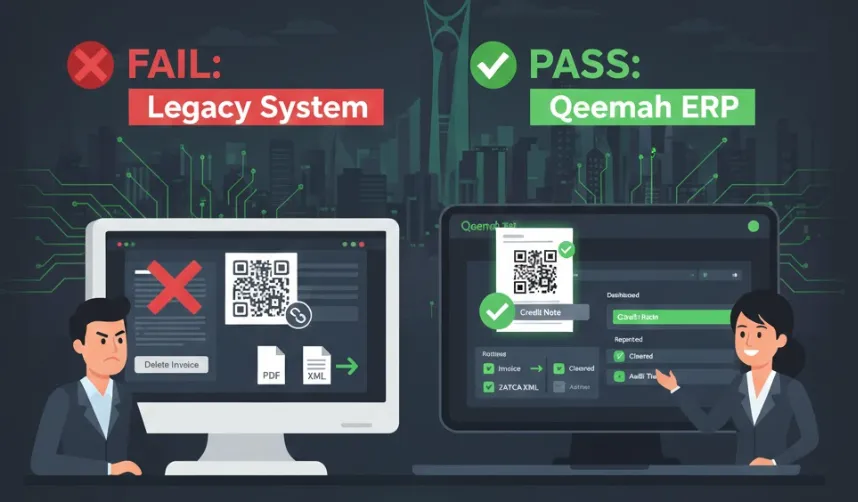
You bought an accounting system that promised “ZATCA Compliance.” It prints a QR code on the invoice. You think you’re safe.
You might be wrong.
Many legacy software providers are selling “Phase 1” solutions disguised as “Phase 2” ready. In 2025, using a Phase 1 system (Generation only) when you are targeted for Phase 2 (Integration) is a violation.
Here is how to audit your software in 5 minutes.
The 5-Point “True Compliance” Test
1. The “Delete” Button Test
Go to an invoice you issued last week. Try to delete it.
- If it lets you delete it: ❌ FAIL.
- If it says “Create Credit Note instead”: ✅ PASS.
Why? ZATCA Phase 2 requires a “tamper-resistant” log. Deleting an invoice breaks the cryptographic hash chain. Compliant software disables the delete button for posted invoices.
2. The “Invisible File” Test
Export an invoice. Do you get just a PDF?
- PDF only: ❌ FAIL (likely).
- XML file (or PDF/A-3 with embedded XML): ✅ PASS.
Why? As explained in our main guide, ZATCA does not read PDFs. If your software cannot export the xml file, it cannot talk to ZATCA.
3. The QR Code Scan
Scan the QR code on your invoice using the official ZATCA App (not your phone camera).
- Shows a website link: ❌ FAIL.
- Shows “Seller Name” and “VAT Total”: ⚠️ Phase 1 Only.
- Shows a long text string (Base64) or “Verified”: ✅ PASS.
Why? Phase 2 QR codes are complex, encrypted data blocks containing the digital signature. Simple URL links are invalid. For a technical deep-dive, see our ZATCA QR Code & TLV Encoding guide.
4. The “Sync” Indicator
Look at your invoice list. Is there a status column?
- Status: Paid/Unpaid: ⚠️ Not enough.
- Status: Reported / Cleared / Rejected: ✅ PASS.
Why? You need to know if ZATCA received the invoice. If your software doesn’t show you the ZATCA status, you are flying blind.
5. The “Edit” Test
Try to change the price on an invoice issued yesterday.
- It lets you edit and save: ❌ FAIL.
- It forces you to reverse and recreate: ✅ PASS.
Why? Editing a signed invoice invalidates the cryptographic stamp.
The Risks of “Fake” Compliance
If your software fails these tests, you are likely generating “Paper Invoices” in a digital format. According to ZATCA’s official e-invoicing guidelines, businesses must submit electronically through the Fatoora portal — PDFs alone do not satisfy the mandate.
- Penalty: Up to SAR 50,000 for failing to integrate. ZATCA has been actively enforcing penalties since Wave 1 of Phase 2 in January 2023, and enforcement is ramping up for newer waves.
- Business Risk: Your clients (B2B) cannot claim VAT input deduction if your invoice doesn’t clear ZATCA. They will stop buying from you.
- Audit Trail Risk: Without true digital integration, your books won’t satisfy the 10-year retention requirement enforced by ZATCA.
Common Errors Hidden in “Compliant” Software
Even software that passes some of the tests above may still generate rejections. The most common hidden issues include:
- Invalid QR code encoding — Phase 2 requires 9 TLV-encoded tags, not a simple URL. See our ZATCA QR Code & TLV Encoding technical guide for the full specification.
- Missing PIH (Previous Invoice Hash) — Each invoice must reference the hash of the previous invoice, creating an unbreakable chain. Breaking this chain requires a full re-sync with ZATCA.
- Wrong Invoice Type code — Using
388when you need381(credit note) is a common programmatic error. Our ZATCA common errors reference lists all 15 error codes and their fixes. - Incorrect date formatting — XML timestamps must follow ISO 8601. Many legacy systems output local date formats.
If you’re seeing ZATCA Phase 2 rejection errors, your software may be the root cause.
Is it time to switch?
If your current provider is asking for thousands of Riyals to “upgrade” you to a module that should be standard, it’s time to look elsewhere. True Phase 2 compliance shouldn’t be an add-on — it should be the foundation.
Qeemah is built on a “Compliance-First” architecture:
- No “Delete” buttons on posted invoices.
- Automatic XML generation with real-time Fatoora integration.
- Real-time ZATCA status dashboard (Cleared / Reported / Rejected).
- Tamper-proof audit logs with 10-year archiving.
- Free GOSI calculator and VAT calculator built in.
Don’t pay for a patch. Get a solution.